Browser & Local ModeTwo ways to use Lattice.
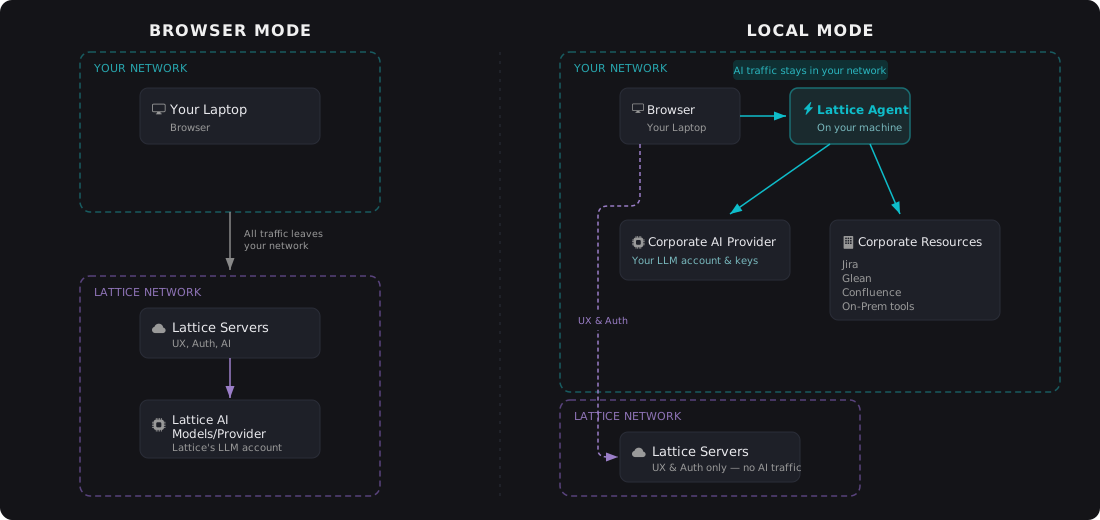
Lattice works in two modes. Browser Mode is the default — everything runs in the cloud, no install required. Local Mode activates when the Lattice Agent is installed on your machine, unlocking additional capabilities like your own LLM credentials, local MCP servers, and access to corporate tools behind your VPN.
Overview
Lattice is a browser-based product management tool. By default, it runs entirely in the cloud — you sign in, and everything works. No downloads, no configuration.
For teams that want more control, Local Mode adds capabilities that require a simple agent installed on your machine. When the agent is installed, Lattice detects it automatically. When it's not, Lattice falls back to Browser Mode. You never have to choose — it just works.
Browser Mode
Browser Mode is how most people use Lattice today. It's the default experience.
- No install required: Sign in from any browser and start working immediately
- Cloud-hosted: AI calls, file storage, and sessions are managed by Lattice servers
- Works everywhere: Any device with a modern browser — laptop, tablet, or shared workstation
- Always up to date: No agent versions to manage or update
Browser Mode gives you the full Lattice experience for PRD drafting, research, annotation, expert review, publishing, and backlog refinement.
Local Mode
Local Mode activates when the Lattice Agent is installed on your machine. The browser detects the agent automatically and routes AI work through it instead of Lattice's cloud servers.
- LLM calls stay local: AI requests route through the agent on your machine, not through Lattice servers
- Your credentials: Use your own API keys with your preferred AI provider
- Local MCP servers: The agent connects to MCP servers and skills configured on your machine
- Corporate tool access: Reach tools behind your VPN — Jira, Glean, Confluence, and others — without proxy workarounds
- Seamless fallback: If the agent isn't running, Lattice switches to Browser Mode automatically
- IT-controlled access: IT admins can require Local Mode and disable fallback to Browser Mode, ensuring all AI traffic stays within your network
Why Local Mode
Local Mode is designed for teams and individuals who need more control over how their AI tools operate.
Your LLM, your cost controls
Bring your own API keys. Use your company's negotiated AI provider contract. Track and manage usage on your terms, not ours.
Access your local tools
The Lattice Agent connects to MCP servers and skills already configured on your machine. If you have tools set up for your workflow — code search, internal knowledge bases, custom integrations — Lattice can use them.
Reach corporate tools behind your VPN
The agent runs on your laptop, so it inherits your machine's network access. It reaches tools like Jira, Glean, and Confluence the same way any application on your laptop would — no special proxy configuration, no firewall exceptions. If your laptop can reach it, so can the agent.
Seamless experience
There's no mode switch or setting to toggle. The browser checks for the agent on page load. If it's there, Local Mode activates. If not, Browser Mode handles everything. You get the same Lattice interface either way.
Security & IT Considerations
Local Mode is designed to work within your existing security posture, not around it.
- Data stays on your machine: In Local Mode, AI requests and responses flow through the agent on your laptop. They don't pass through Lattice servers.
- No credentials shared with Lattice: Your API keys and OAuth tokens are stored and used locally by the agent. Lattice never sees them.
- Works within corporate network policies: The agent operates inside your laptop's existing network boundary. No VPN tunnels, no firewall rule changes, no special IT exceptions needed.
- Secure communication: The browser communicates with the agent using standard, browser-native protocols on localhost.
- No inbound connections: The agent listens only on localhost. Nothing outside your machine can reach it.
Early Access
Local Mode is currently being tested by early adopters. We're working closely with initial users to refine the experience before a broader release.
If you're a PM interested in using your own AI credentials, connecting local tools, or accessing corporate resources through Lattice — we'd love to hear from you.
Reach out at hello@withlattice.com to join the program.